6 min read
Shopify's November 20 App Deadline: What It Changes for Your Store Before Black Friday

If you run a Shopify store, an app vendor may have emailed you this month about "IP allowlists" and a November 20 deadline. It reads like a developer problem, and it lands one week before Black Friday, when nobody wants a new problem. We read Shopify's developer notices on it so we could tell clients which parts actually touch a running store.
My take is simple: November 20 is the deadline least likely to affect your store, and the right move this month is a short app inventory, not an app replacement. The changes that can quietly stop an app are a bulk data rule that's already in force and a token cutoff in April 2027.
This post follows that order, starting with why Shopify is doing this at all.
Why Shopify is locking down app access
Every app on your store talks to Shopify through the Admin API, using an access token that works like a key. Shopify's concern is that a leaked token can be used from any computer on the internet. An IP allowlist ties the app to the server addresses or hosting networks its vendor registers, so Shopify rejects requests from anywhere else, even when they carry a valid token. That makes a stolen key much harder to use.
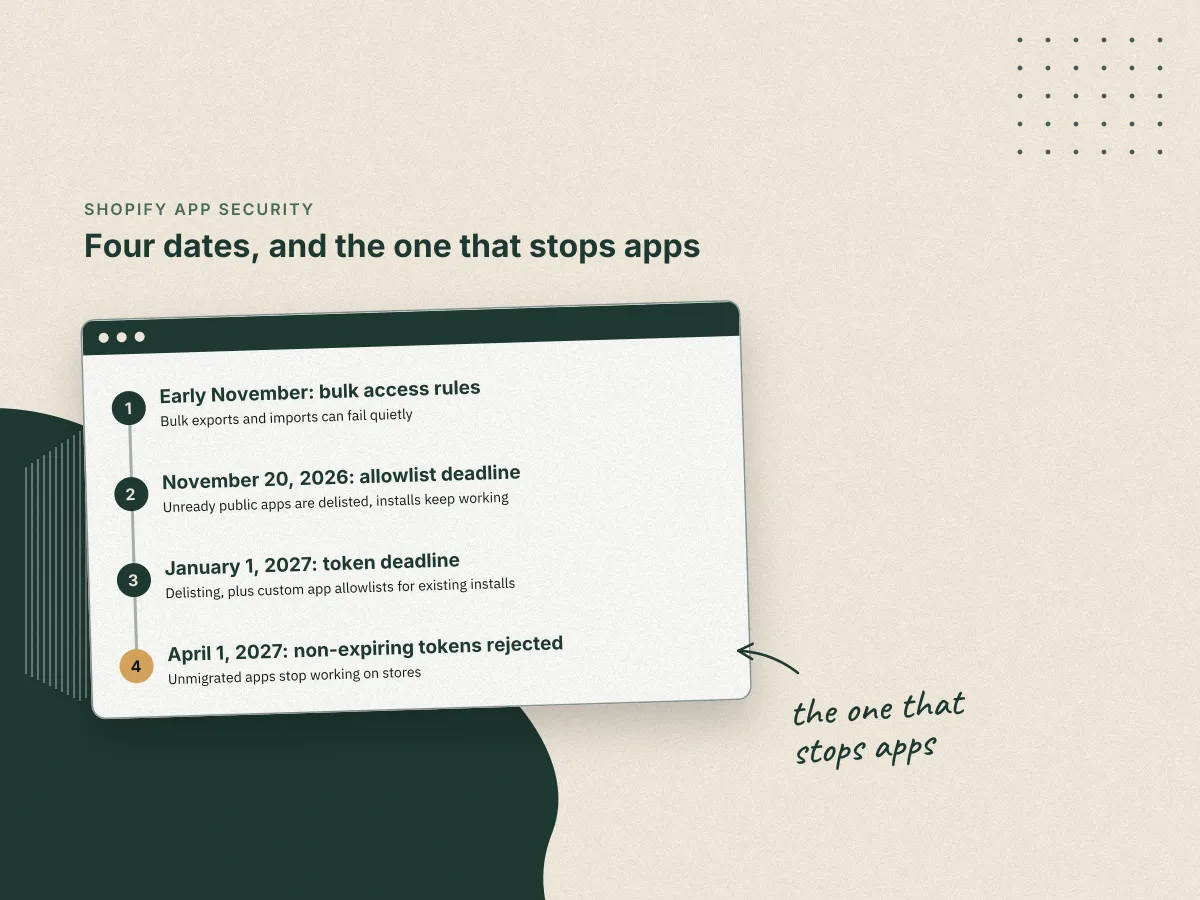
Shopify is rolling this out in stages, and the dates sit close enough together that they blur. The rest of this post takes them one at a time, in the order they arrive.
What happens on November 20
Shopify's deadline is November 20, 2026, at 11:59 PM Eastern. From then on, every public app that calls the Admin API needs an IP allowlist. A public app is one any store can install, usually through the Shopify App Store, which covers most of what's installed on a typical store. Apps that miss the deadline are delisted from the App Store and blocked from new installs.
Shopify is clear that existing installs keep working. If an app you rely on disappears from the App Store on November 21, your checkout, your syncs, and your storefront don't change. Shopify does flag these apps in Settings > Apps, so that's the quickest place to see which of yours are affected. Shopify also says it will relist the app automatically once the vendor adds an allowlist.
So the November 20 date is a penalty on the vendor's listing, not on your store. A missing listing is still worth writing down, because a vendor that skipped a clearly flagged security deadline is telling you how it maintains the app. I'd keep that note for January rather than act on it during the busiest week of the year.
The change that's already in force
The rule that can interrupt a store landed earlier in November, and it applies to bulk operations.
Technical detail: A bulk operation is how an app moves a large amount of data through Shopify's GraphQL Admin API in one request, instead of reading records one page at a time. An app built by a partner now needs bulk access turned on in the Partner Dashboard before it can run one, and apps that already ran bulk operations were enabled automatically. If an app doesn't start a bulk query or bulk mutation for 31 days, it loses that access and its vendor has to turn it on again. Separately, bulk operations from public apps without an IP allowlist now fail to run. In both cases, Shopify refuses the app's request.
In plain terms: apps that move a lot of data at once, like catalog exporters, marketplace feeds, inventory syncs, and reporting connectors, can stop working without any warning in your admin. Apps that handle one order at a time as it comes in, like most notification and review tools, generally don't use bulk operations.
The failure is quiet, which is what makes it worth checking. An app that's denied bulk access usually logs a failed background job instead of showing you a banner. In practice, that looks like a product feed still showing last week's prices, or a nightly export that finished with zero rows. The 31-day rule also means an app that works today can lose access in December if its seasonal export sits idle, so one check isn't enough.
Custom apps built by a developer
Custom apps follow a slower schedule, and the question that matters for them is who owns them. If an agency or freelancer built a custom app and installed it on your store from their own Partner organization, it needs an IP allowlist for new installs from November 20, 2026, and for existing installs from January 1, 2027. Apps you created yourself in your Shopify admin, and apps installed only inside the organization that owns them, aren't affected.
The custom apps most likely to miss January 1 are the ones built for a project that ended years ago, because nobody is watching them anymore. Every developer has an old one of these somewhere, which is why I'd ask about ownership now instead of in late December. It's the same reason we keep theme code in GitHub with a clear owner, as I described in how we run Shopify themes in GitHub.
The April 2027 cutoff
The date that can actually turn an app off is further away. Shopify requires public apps to move from access tokens that never expire to tokens that expire and refresh. Apps that haven't moved are delisted and blocked from new installs on January 1, 2027, and merchants using them start seeing a warning in the Shopify admin on January 15. On April 1, 2027, Admin API requests made with a non-expiring token return an HTTP 403 error, so the app stops working on stores that already have it.
If you see that warning in your admin in January, treat it as about eleven weeks to hear back from the vendor or replace the app. That's enough time to do it calmly, as long as nobody dismisses the banner as one more admin notice.
What I'd do before Black Friday

None of these steps involve touching code, and each one builds on the step before it.
- List the apps that move data in bulk, such as catalog exporters, marketplace feeds, inventory syncs, and reporting tools, so you know which ones this rule can reach.
- Open the sync history for each of those apps and find the last successful run, because a job that last succeeded in early or mid-November is the sign of lost bulk access.
- Email the vendors behind those apps and ask whether they've turned on bulk access and set up an IP allowlist, so a quiet failure doesn't surprise you over Black Friday weekend.
- Find out who built each custom app on your store and whose Partner organization installed it, so January 1 doesn't arrive with an app nobody owns.
- Hold off on installing or replacing apps until December, since a working integration is safer than a new one during your busiest week.
- Set a reminder for mid-December to repeat step 2, because the 31-day rule can switch off access that worked in November.
The November 20 headline is louder than its effect on your store, and that list of bulk-data apps is what actually protects your holiday sales. If your app list has grown over the years, the cleanup ideas in Outgrowing Your Shopify Theme are a good next step once the holidays are over. If you'd like a second set of eyes on the list, or on a custom app with an unclear owner, we're happy to take a look.